


The Samsung Galaxy S26 Ultra ships with a camera system that goes far deeper than most owners ever explore. Beyond the default Photo and Video modes, a suite of shooting options including two downloadable extras from the Galaxy Store push the hardware to its true ceiling.
Super Steady with Horizontal Lock
Walking shots have a way of destroying otherwise good footage. Super Steady, available inside Video mode, tackles camera shake at the source. Tap the stabilisation icon next to the flash button in the viewfinder and you activate it. Add Horizontal Lock on top and the phone corrects tilt automatically, keeping the horizon level even when your wrist rotates mid-shot. The trade-off is a marginally tighter field of view, a fair exchange for footage that actually holds together.
The low light video feature on the Galaxy S26 Ultra relies on Nightography, a function that comes incorporated into the default Video mode and not as a separate toggle. With the wide camera lens having a wider aperture of f/1.4 compared to its predecessor, 47% more light is available for processing even before any noise is reduced. By enabling Auto FPS under video modes, the phone automatically lowers the frames per second during shooting in dim lighting to allow more light into each frame.
Pro Mode
Pro mode hands over full manual control: ISO, shutter speed, white balance, focus, exposure compensation, and RAW capture. Access it under More in the mode selector. Long exposures at night, motion freeze with a high shutter speed, or simply bypassing Samsung‘s aggressive automatic processing this is where those scenarios play out. Saving RAW files alongside JPEGs gives considerably more room to recover highlights and shadows in editing.
Also Read: Samsung Galaxy Tab S12+ Launch Is Closer Than You Think!
Pro Video Mode
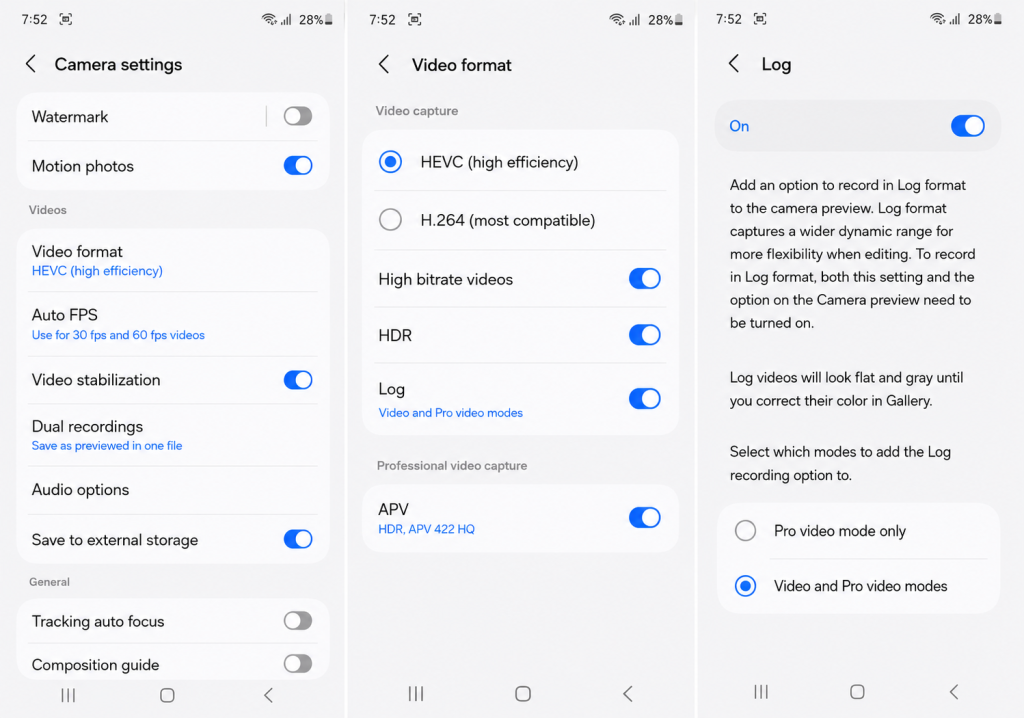
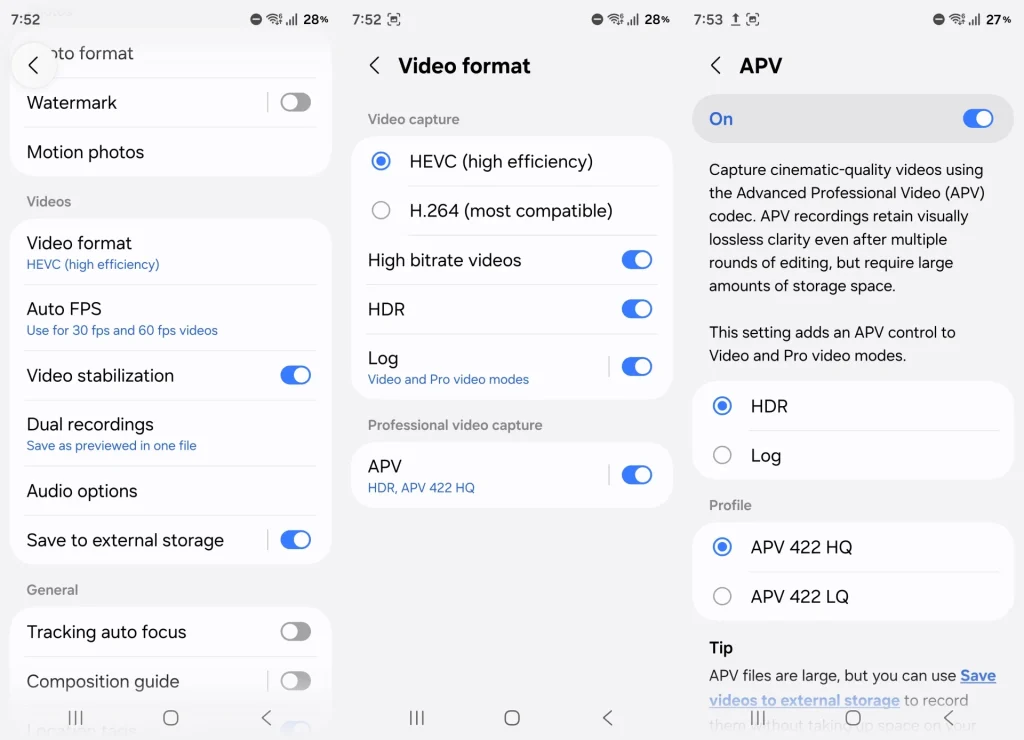
The manual equivalent for video unlocks frame rates the standard mode withholds, including 4K at 120fps and 8K at 24fps. Log video recording enabled at Camera Settings > Video format captures flat, low-contrast footage optimised for colour grading in post. A real-time LUT preview lets you audition a grade on the viewfinder before you commit to it in editing. The APV codec, toggled separately under Video format, preserves far more colour data than standard compression, producing significantly better source material for professional edits. APV files run large; Samsung allows direct recording to external storage to compensate.
Expert RAW is a free Galaxy Store download and a different beast from the built-in camera. Multi-frame RAW capture yields files with wider dynamic range than Pro mode output. The astrophotography function includes extended exposure time and a Sky Guide that highlights constellations on the screen in real-time. Among other innovative features of the new S26 Ultra model is the Virtual Reflector mode that replicates a photography reflector, which reflects light on objects to create an effect of backlit images.
Portrait Mode
There is also a separation created by the f/1.4 aperture, but the 3x and 5x lenses for the telephoto mode create a better proportioned look on faces than shooting with 1x. This is because shooting wider angle causes distortion to the image that is avoided when using the telephoto lens. Blurring is adjustable both pre-shooting and post-shooting.
Slow Motion
Slow motion records at 240fps in FHD or 120fps at 4K. Find it under More in the mode selector. Water, sports, and fast movement with distinct phases benefit most footage where individual frames hold real detail that normal playback would compress into a blur.
Both modes arrive via Camera Assistant, a free Galaxy Store download. Single Take fires across multiple lenses simultaneously on one shutter press and presents the best results as a set useful for spontaneous moments where mode-switching means missing the shot. Dual Rec records front and rear cameras at once, saving either a split-screen file or two separate clips depending on settings configured at Camera Settings > Dual recordings.
Faraz Ali Ansari is the Founder & Editor of Focus Pakistan and Founder & CEO of Focus Public Relations. With more than 22 years of experience in journalism, media relations and strategic communications, he covers business, economy, aviation, technology, public policy and corporate affairs. He has worked with leading national and international organizations across multiple sectors.